Leads from Google Maps? Say Less. We Got You.
Extract High-Quality
Google Maps Leads
in Minutes
Find local businesses, emails, phone numbers, websites, social profiles, and export everything into CSV for outreach campaigns that actually convert.
How It Works
See Focus Map Scraper in Action
Discover how effortlessly it pulls high-intent leads right from the map
Easy steps to start extracting leads:
Step 1: Install Focus Map Scraper
Simply install the Focus Map Scraper Chrome extension to get started. No complex setup, just a few clicks and you’re ready to go.
Step 2: Customize Keywords & Locations
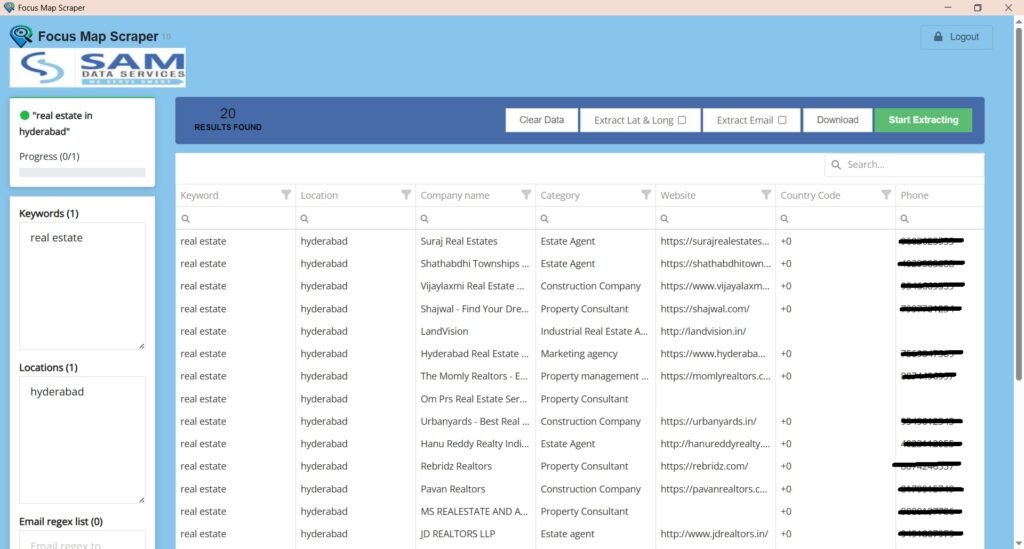
Enter your desired keywords and locations to narrow down your lead search. Focus Map Scraper allows you to target specific industries and regions for more refined data extraction.
Step 3: Start Extracting Data
Activate the tool and let Focus Map Scraper automatically collect phone numbers, emails, and website links from businesses listed on Google Maps.
Step 4: Export & Use Your Data
Once the data is collected, export it to Excel for easy access and further use in your marketing campaigns or lead generation.
Enjoy Your Results!
Save time and focus on connecting with your leads.
The Problem
Manual lead generation is killing your pipeline
Hours wasted copying from Google Maps. Incomplete data. Low-quality lists. We fix all of that.
❌ Without Focus Map Scraper
- ❌ Manually copy-pasting Google Maps data for hours
- ❌ Missing emails — only finding phone numbers
- ❌ Inconsistent, incomplete prospect lists
- ❌ No social profiles or website URLs
- ❌ Spending 5+ hours to build a list of 100 leads
- ❌ No way to filter by rating, reviews, or industry
✅ With Focus Map Scraper
- ✅ Automated extraction in minutes, not hours
✅ Email discovery from business websites
✅ Verified business info with accuracy scores
✅ Social profiles, websites, and direct contacts
✅ 100 leads in under 3 minutes
✅ Advanced filters: rating, reviews, category
Features
Everything you need to build a killer lead list
A complete Google Maps data extraction platform built for agencies, sales teams, and solo operators.
Google Maps Scraping
Extract business names, addresses, ratings, review counts, hours, categories, and more from any Google Maps search.
Email Finder
Automatically discovers email addresses from business websites, contact pages, and public directories.
Phone Number Extraction
Capture direct phone numbers, mobile lines, and WhatsApp contacts for multi-channel outreach.
Social Profile Discovery
Find LinkedIn, Instagram, Facebook, Twitter, and YouTube profiles linked from business websites.
CSV / Excel Export
Export all extracted data into clean CSV or Excel files, ready to import into any CRM or email tool.
Bulk Searches
Run hundreds of keyword + location combinations in a single job. Perfect for agency-scale prospecting.
Location-Based Targeting
Target any city, zip code, region, or country. Supports global searches in 50+ countries.
Lead Qualification
Filter leads by rating, review count, has website, has email, and more to find only your best prospects.
CRM Integration
Push leads directly to HubSpot, Salesforce, Pipedrive, or any CRM via Zapier and native integrations.
Pricing
Simple, transparent pricing
Choose the plan that fits your needs best
1 Month Plan
Quick start for lead generation.-
Perfect to try
-
Full access for 1 month
-
24/7 support
3 Month Plan
Grow your prospect list faster.-
Best for short-term needs
-
Full access for 3 months
-
Priority support
6 Months Plan
Scale outreach with confidence.-
Best for mid-term users
-
Full access for 6 months
-
Priority support
1 Year Plan
Best value for maximum results.-
Best value for long-term users
-
Full access for 1 year
-
Premium support
Social Proof
Loved by growth teams worldwide
Extract High-Intent Leads – Trusted by Marketers & Agencies



FAQ
Frequently asked questions
Find answers to common questions
How does Focus Map Scraper work?
Focus Map Scraper is a Google Chrome extension that directly extracts public business data from Google Maps. Just enter your target keywords and locations, and the tool scrapes the details for you in real-time. No coding or API keys are required.
Do I need to install any software?
No. All you need is the Google Chrome browser. Simply install our extension, enter your license key, and you can start scraping leads immediately.
What type of data can it extract?
It collects publicly listed business information, including business names, phone numbers, verified emails, websites, addresses, ratings, and more. It’s perfect for building targeted lead lists.
Does it work on Mac or only on Windows?
Yes! Because it’s a browser extension, it works seamlessly on any operating system that runs Google Chrome, including Mac, Windows, and Linux.
How secure is the data extraction process?
Your privacy and security are a priority. The tool only scrapes data that is publicly available and intended for business visibility. Your usage is completely private.
How can I get the license?
It’s simple. Click the “Buy Full Version” button within the extension, choose your preferred payment method (we accept UPI, Bank Transfer, PayPal, etc.), and complete the purchase. You’ll receive an activation key by email to unlock unlimited data extraction.
GET IN TOUCH
Send us a message
We’d love to hear from you. Send us a message and we’ll respond as soon as possible.